
Print Logo

How to Choose a CNC Laser Cutting Machine?

Choosing a Cnc Laser Cutting Machine is not just a matter of buying the highest-wattage model. The right machine depends on what you cut, how often you run it, and the finish your customers expect. A small workshop producing acrylic signs has different needs from a factory processing thick steel sheets every shift. Start with the actual work.

Material type and thickness help narrow the options. Fiber lasers are commonly used for metals, while CO2 systems may suit wood, acrylic, and other non-metal materials. These are broad guidelines, not guarantees. Confirm compatibility with the machine manufacturer and test representative samples when possible. A clean edge on a thin sheet tells you little about performance on a thicker one.

Look beyond the laser source. Bed size, positioning accuracy, cutting speed, software, extraction, and operator training all affect daily results. So does service. Ask how quickly replacement parts are available and whether technicians can help with setup. A machine that looks impressive in a showroom may feel less convincing after a week of production delays. That is worth considering.

This guide explains the key questions to ask before comparing models, from power and work area to safety features and total operating cost. It also highlights common trade-offs, because there is rarely one perfect configuration. Be cautious of claims that promise both maximum speed and flawless cuts on every material. Real performance depends on settings, maintenance, and the material itself. A practical choice begins with measured needs, not a specification sheet alone.
How to Choose a CNC Laser Cutting Machine?

Define Your Cutting Requirements and Production Goals

Before comparing CNC laser cutting machines, define the jobs they must handle. List material types, maximum and typical sheet thicknesses, sheet sizes, and required edge quality. A shop cutting 1 mm stainless steel all day has different needs from one switching between 6 mm mild steel and aluminum. Be specific. Record parts per shift, weekly mix, and acceptable changeover time. Then estimate the share of work that truly needs laser cutting; buying for a rare, thick-material job can distort the whole decision.

Set measurable production goals: parts per hour, first-pass quality, uptime, and labor per job. Include loading, unloading, nesting, and maintenance in cycle-time estimates. A fast cutting head cannot compensate for slow material handling. ISO 9013 provides a framework for specifying thermal-cut edge quality, helping buyers turn “clean edges” into requirements they can compare.

Deloitte’s 2024 smart manufacturing survey found that 86% of executives expect smart manufacturing to be a primary driver of competitiveness within five years. That supports evaluating data connectivity, but software features matter only when they address a real bottleneck. Check them against your operators’ workflow. They may miss something. Leave room to revisit your assumptions after timed trials with representative parts.

Compare CNC Laser Types and Suitable Materials

How to Choose a CNC Laser Cutting Machine?

Compare CNC Laser Types and Suitable Materials

A CNC laser’s wavelength helps determine which materials it can cut efficiently. Industrial fiber lasers commonly operate near 1.07 μm, while CO₂ lasers operate near 10.6 μm, as reported in technical references from the Laser Institute of America. Fiber systems are widely used for steel, stainless steel, and aluminum sheet. They can also process copper, but highly reflective surfaces need suitable equipment and careful setup. CO₂ lasers are often chosen for acrylic, wood, paper, and textiles. They can cut metals too, though material thickness and machine power matter. A wavelength alone does not guarantee a clean edge.

Compare the material list with your daily work, not occasional jobs. For example, a shop cutting 3 mm stainless steel has different priorities from one engraving plywood signs. Check the machine’s rated thickness, assist-gas requirements, kerf width, and extraction system. Ask for a sample cut using your own material; small differences in coating or surface finish can affect results. There is no perfect choice. I would reassess the choice if production needs change.

Tips: Record material type, thickness, cut speed, and edge quality during a trial. Keep the settings log. It may reveal a mismatch before purchase.

How to Choose a CNC Laser Cutting Machine?

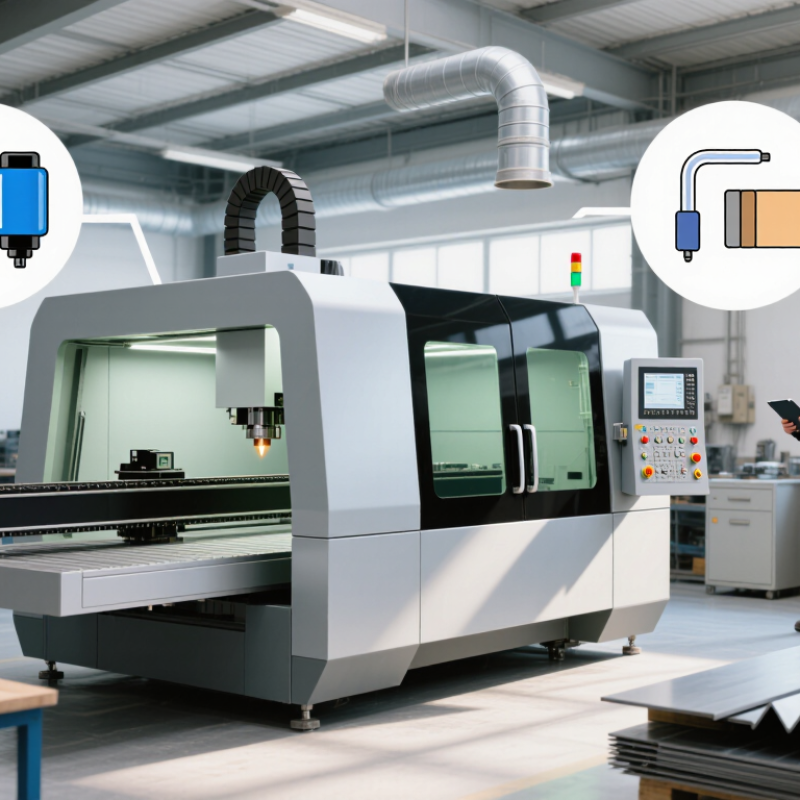
Compare typical laser wavelengths and the materials each type is commonly suited to cut.

CO₂ lasers are commonly used for wood, acrylic, paper, and other non-metals. Fiber lasers are widely used for cutting metals such as steel and aluminum. Blue diode lasers are generally suited to thin wood, paper, and some plastics, but are not typically used for cutting bare metals. Actual cutting capability depends on laser power, machine configuration, and material thickness.

Evaluate Power, Work Area, Accuracy, and Speed

How to Choose a CNC Laser Cutting Machine?
Evaluate Power, Work Area, Accuracy, and Speed

Start with the materials and thickness you actually plan to cut. Higher laser power can cut thicker stock faster, but it may also leave wider kerfs or darker edges on thin materials. A 10 mm sheet and a delicate 1 mm panel need different settings. Check the machine’s rated cutting capacity against your routine jobs, not just its best-case demonstration. Leave room for occasional variation.

Next, measure your largest workpiece and allow space for loading and clamping. A tight work area can waste time, even when the laser is powerful. Accuracy depends on more than the machine’s advertised figure: motion components, focus, material flatness, and maintenance all matter. Ask for repeatability data, then test a familiar design with small holes and fine corners. Speed is useful, but fast movement does not guarantee clean cuts. That trade-off is easy to miss.

Tips: Compare sample cuts in your own material. Look for smooth edges, consistent dimensions, and minimal scorching. Confirm how quickly the machine can return to the same position. Keep a little extra work-area capacity if your projects may grow. And be honest about your workload; buying for a rare job can be a costly mistake.

How to Choose a CNC Laser Cutting Machine? - Evaluate Power, Work Area, Accuracy, and Speed

Evaluation Dimension Typical Technical Range Best-Fit Applications What to Check Before Buying
Laser Power 40–150 W for CO2 systems; 1–6 kW for fiber systems CO2: wood, acrylic, plastics, leather, and textiles.
Fiber: mild steel, stainless steel, aluminum, brass, and copper.
Choose power according to the thickest material and required production volume. Higher power can improve cutting capability, but it may increase purchase price, energy consumption, and operating requirements.
Maximum Material Thickness Depends on laser type, material, power, assist gas, and cutting quality; commonly from thin sheet metal to approximately 20–25 mm mild steel on higher-power systems Thin sheet processing, medium-gauge fabrication, or heavy-duty metal cutting Ask for test cuts using the exact material grade and thickness. Confirm edge quality, heat-affected zone, dross level, and whether the stated thickness is for production cutting or occasional maximum cutting.
Work Area Common sheet formats include approximately 1,300 × 900 mm, 1,500 × 3,000 mm, and 2,000 × 4,000 mm Small parts, standard industrial sheets, large panels, or full-sheet production The usable cutting area should exceed the largest regular part or sheet. Allow space for clamps, loading, nesting, scrap clearance, and future product sizes.
Positioning Accuracy Typically about ±0.02–0.10 mm, depending on machine construction, axis length, calibration, and test standard General fabrication, precision components, signs, enclosures, and repeat production Review the measurement standard, axis positioning accuracy, repeatability, and accuracy across the entire work area. Do not compare figures that were measured under different standards.
Repeatability Often approximately ±0.01–0.05 mm on well-maintained industrial machines Batch production, interchangeable parts, and nested components Request a repeatability test with multiple return-to-position cycles. Check whether accuracy remains stable after long operating periods and temperature changes.
Maximum Travel Speed Approximately 500–2,000 mm/s for many CO2 systems; approximately 1,000–3,000 mm/s for some fiber systems High-volume cutting with long straight lines and frequent rapid movements Maximum travel speed is not the same as cutting speed. Compare actual cutting speed for your material, thickness, contour complexity, acceleration, and corner performance.
Cutting Speed Varies widely: thin non-metal sheets may be cut at hundreds of mm/s; metal cutting is commonly specified in mm/min and depends strongly on thickness and power Short-run prototyping, general fabrication, or continuous production Use cycle-time tests that include piercing, lead-ins, contours, repositioning, and unloading. A machine with a lower advertised maximum speed may still deliver a shorter complete cycle time.
Laser Type CO2 for many non-metals; fiber for electrically conductive metals; other laser sources for specialized materials Select the source based on material absorption, thickness, surface finish, and required process Confirm that the laser source is suitable for every planned material. Some materials, including certain PVC products, can release hazardous gases when processed and should not be cut without professional safety approval.
Beam Quality and Spot Size Smaller spot sizes generally support finer details; practical results depend on optics, focus, beam mode, and material Fine lettering, intricate profiles, small holes, and detailed engraving Evaluate the smallest recommended feature, minimum hole diameter, kerf width, and edge quality on the intended material rather than relying only on the nominal spot-size specification.
Assist Gas System Compressed air, nitrogen, or oxygen; pressure and consumption vary by material, thickness, nozzle, and power Air for lower operating cost; nitrogen for cleaner metal edges; oxygen for selected carbon-steel cutting conditions Calculate gas cost and availability. Verify regulator capacity, filtration, purity requirements, nozzle alignment, and whether the machine includes automatic pressure control.
Control and File Compatibility Common workflows use CAD/CAM software and vector formats such as DXF, DWG, AI, SVG, or equivalent machine-ready files Design offices, job shops, production lines, and automated nesting Check nesting functions, lead-in and lead-out control, kerf compensation, parameter libraries, height sensing, remote diagnostics, and compatibility with the current design workflow.
Cooling and Duty Cycle Air cooling for some lower-power systems; liquid cooling is common for higher-power laser sources Occasional use, daily production, or continuous multi-shift operation Confirm chiller capacity, temperature stability, filtration, alarm functions, maintenance intervals, and whether the machine is rated for the planned daily operating hours.
Safety and Extraction Enclosed systems, interlocked access panels, emergency stops, fume extraction, and suitable fire protection are standard safety considerations Workshops, factories, schools, and facilities with multiple operators Check enclosure classification, interlocks, laser safety controls, ventilation, fume filtration, fire detection, operator training requirements, and compliance with applicable local regulations.
Total Cost of Ownership Includes machine price, installation, power, assist gas, consumables, maintenance, software, downtime, and operator training Any buyer comparing long-term value rather than purchase price alone Estimate cost per finished part using realistic utilization and scrap rates. Include lenses, nozzles, protective windows, filters, cooling service, calibration, and expected service response time.

Note: The figures are typical planning ranges rather than guaranteed specifications. Actual performance depends on machine design, material grade, thickness, assist gas, optics, cutting parameters, maintenance, and applicable testing standards.

Assess Software, Safety Features, and Operating Costs

When choosing a CNC laser cutting machine, test the software with files similar to your daily work. Can it import your design formats, arrange parts efficiently, and show a clear preview before cutting? Ask an operator to demonstrate setup, nesting, and error recovery. Small interface delays can add up across a busy shift. A polished screen is not enough.

Safety features deserve hands-on inspection. Look for guarded cutting areas, a reliable emergency stop, clear status indicators, and effective fume extraction. Check how the machine behaves when a door opens or a fault occurs. Staff should be able to explain safe startup and shutdown steps without guessing. It should feel straightforward. Still, no feature replaces careful training and routine checks.

Operating costs extend beyond the purchase price. Compare expected power use, assist-gas needs, replacement optics, consumables, and service intervals. Ask what maintenance workers can handle themselves and which tasks require specialist support. A detailed cost estimate is useful, but real usage may differ from the supplier’s figures. That uncertainty matters. Keep a simple log of energy, material waste, downtime, and parts replaced during a trial period. The data may reveal that a slower setting costs less overall, especially when it reduces scrap or frequent maintenance. I would not assume the cheapest machine is the least expensive to run.

Verify Support, Maintenance, and Supplier Reliability

How to Choose a CNC Laser Cutting Machine?

A CNC laser cutter is only as reliable as the support behind it. During machine trials, ask who handles faults after installation. A delayed answer can stop production for days. The U.S. Department of Energy’s Operations & Maintenance Best Practices Guide reports that effective maintenance may reduce costs by 8–12% compared with reactive maintenance. This makes service planning a purchasing issue, not an afterthought.

Request a written maintenance schedule, spare-parts policy, and technician response times. Check whether remote diagnostics are available and whether local engineers can visit your facility. Ask for two current customer references in a similar production environment. Their answers should cover downtime, training quality, and repair speed. A polished demonstration proves little. I have seen impressive machines perform well during trials, yet supplier communication weakened after payment. That risk deserves attention.

Tips: Inspect the service agreement line by line. Confirm consumable prices, warranty exclusions, software support, and emergency contact hours. Keep a simple log of every supplier promise. Also, calculate the cost of one idle production day. The figure may change your buying decision. A supplier with a lower machine price may become expensive when parts arrive slowly. ISO 9001 certification can indicate controlled processes, but it does not guarantee responsive support. Verify actual performance through references, records, and a practical service test.